A quarter of a million meters, watched.
Around 250,000 Powerpals were clipped onto meters in Victorian homes, paid for by the Victorian Government, so households could see what their power was doing as it happened.
For Powerpal Bluetooth energy monitors Now in beta
The official Powerpal app is no longer supported and won't get new tariffs, so it can't price modern plans like free power windows. PowerMate talks to your Powerpal directly over Bluetooth and prices every reading against the plan you're actually on. It can also find you a cheaper one.
01The legacy
Powerpals installed across Victoria
Around 250,000 Powerpals were clipped onto meters in Victorian homes, paid for by the Victorian Government, so households could see what their power was doing as it happened.
Each light here is a Powerpal counting the blinks of its meter's LED. The hardware is good, and every one of them still measures accurately.
The official app is no longer supported and won't get new tariffs. It still runs, but it can't express modern plans like free power windows. So the cost of every reading is wrong.
A monitor that can't tell you what your power costs has lost its point. Working hardware ends up in drawers, then in landfill. That's a quarter of a million devices that Victorians have already paid for.
PowerMate connects to the Powerpal you already have and prices every reading against your real plan, free power windows included. Enter your tariff, or adopt any current plan at your postcode in one tap. No new hardware, no subscription.
Got a Powerpal on your meter, or in a drawer? It's still a good energy monitor. Join the beta →
02How it works
Your electricity meter blinks an LED for every watt-hour that flows through it, usually 1,000 times per kWh. A Powerpal sits over that light and counts the blinks. PowerMate reads the count from the Powerpal over Bluetooth and turns the time between blinks into watts and dollars.
Switch things on
03The energy clock
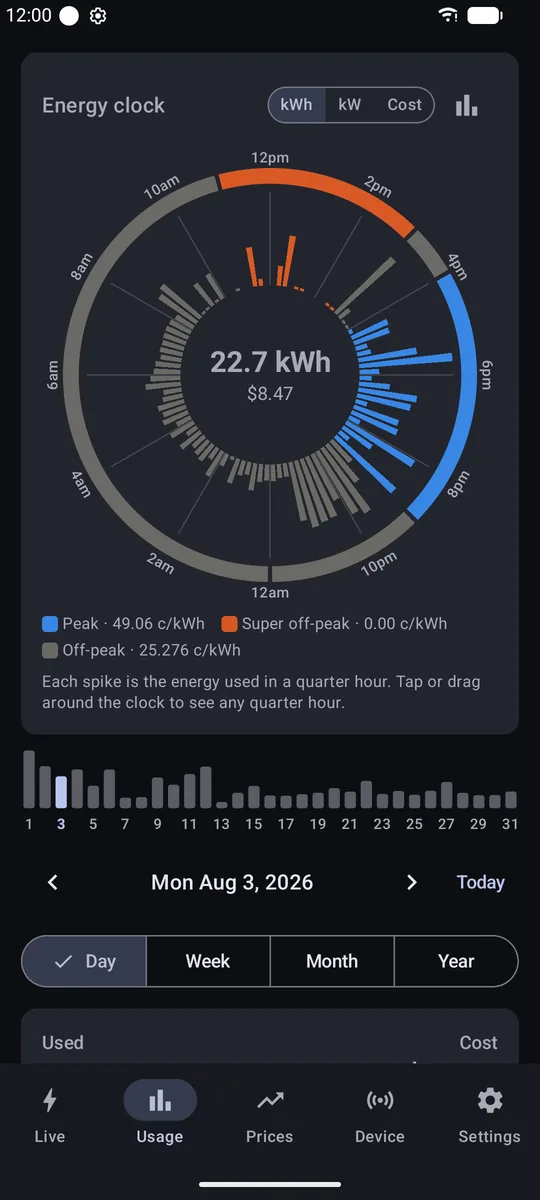
PowerMate draws each day as a 24-hour dial. Every spike is a quarter of an hour, coloured by the rate you were paying at the time, including the free power windows the original app has no way to express. Drag the big loads around the clock and watch what the day costs.
Example time-of-use plan, energy only. The supply charge is extra. PowerMate uses your own plan and your real readings.
04Find a better plan
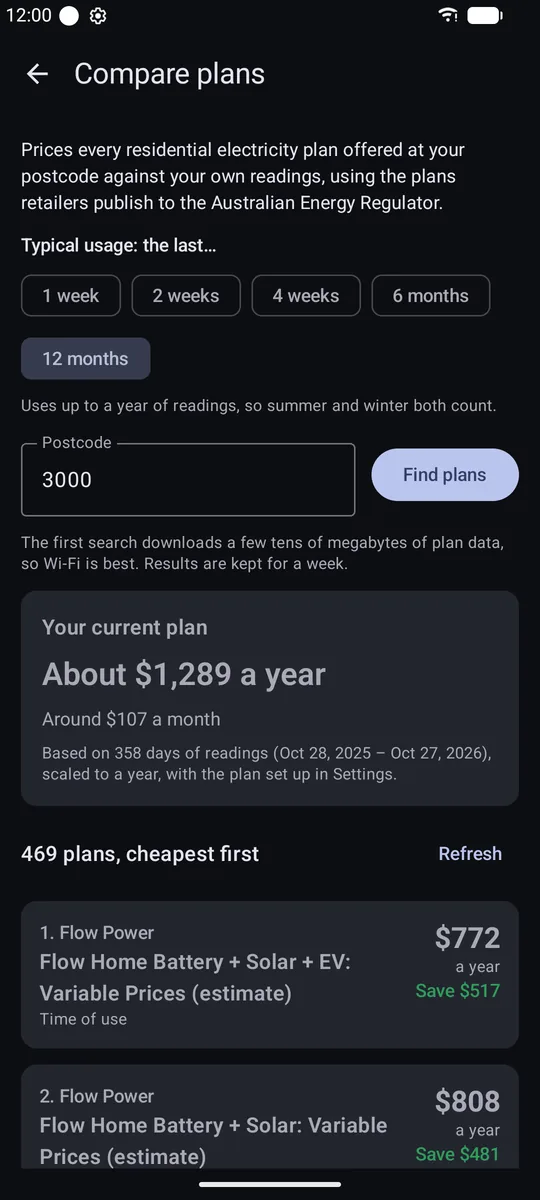
PowerMate downloads every residential electricity plan offered at your postcode, using the plan data retailers publish under the Consumer Data Right. It prices each plan against your own readings. Then you can adopt the winner as your tariff in one tap.
Example plans and prices, for illustration. Plan comparison covers Victoria and uses the Australian Energy Regulator's Energy Made Easy data. Plans are filtered by postcode on your phone.
05The app
Live
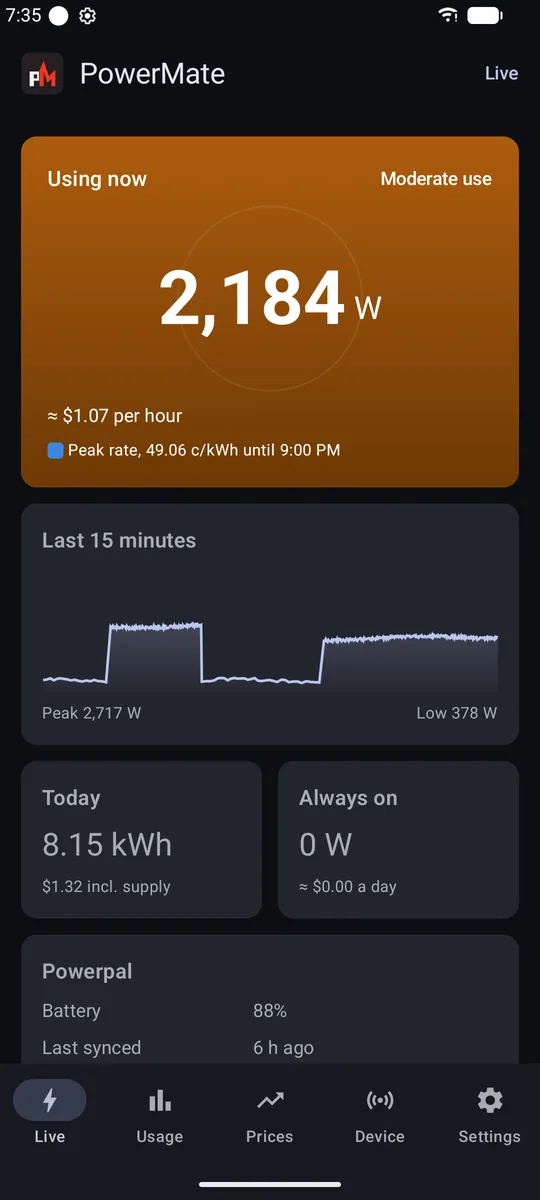
Live power from your meter's pulses, what it's costing per hour at your current rate, and the last 15 minutes as a trend.
Energy clock
A 24-hour dial of quarter-hour energy, five-minute power or cost, coloured by the rate in force. A strip of the month's days lets you jump to any of them.
History
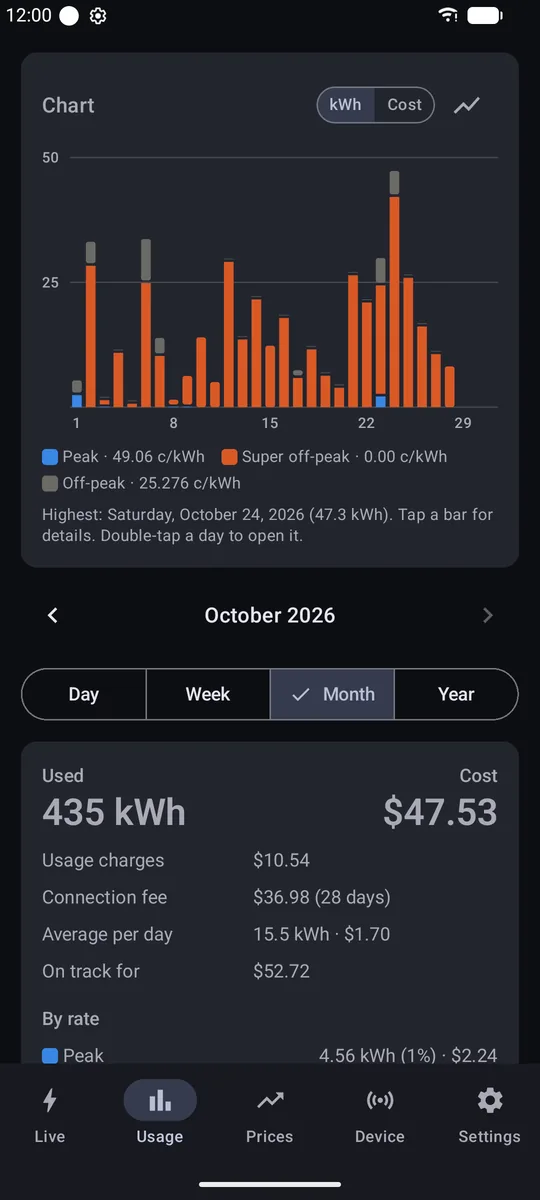
Day, week, month and year views as a bar chart, line graph or table, in kWh or dollars. PowerMate catches up whenever it connects, and in the background every couple of hours.
Prices
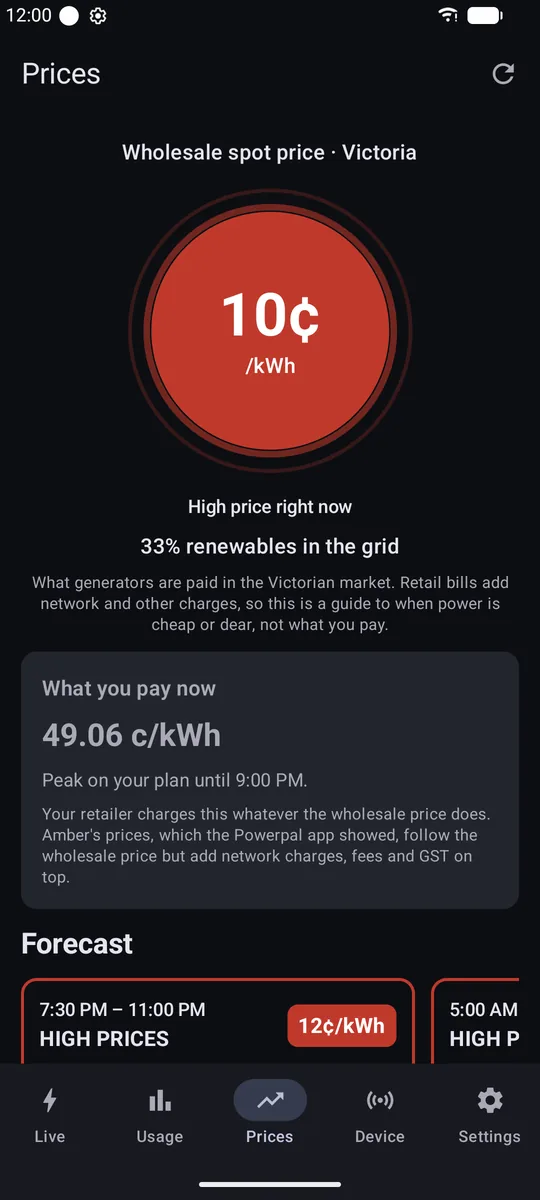
The wholesale spot price for Victoria from AEMO, or your own all-in price if you're with Amber Electric. Also the grid's renewables share and a 24-hour forecast of cheap and expensive stretches.
Your plan
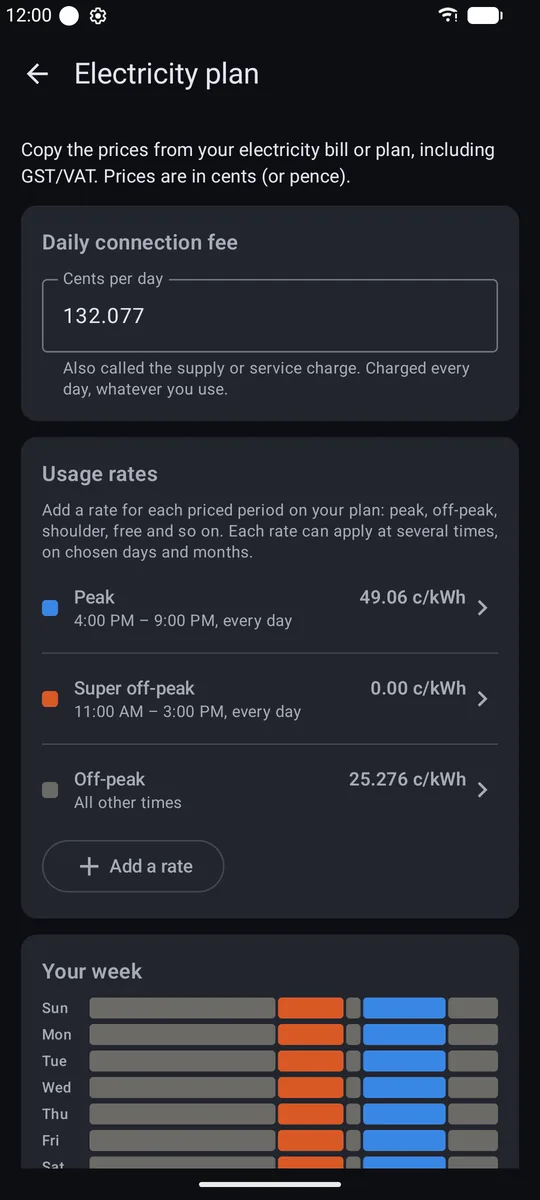
Flat-rate or time-of-use, with peak, shoulder, off-peak and free power windows, weekday and weekend rates, seasons and a daily connection fee. When your retailer changes your plan, you change it too. You also get a projection for the week, month or year.
Compare
Choose how much recent usage counts as typical, from one week to twelve months, then see every plan at your postcode priced against it, cheapest first. Adopt any plan as your PowerMate tariff in one tap.
Reminders before cheap and expensive periods, high usage, a rising always-on load, price spikes, a low battery, and daily and weekly summaries. With "stay connected" on, usage alerts work even when the app is closed.
06Private by design
No account
No server
No ads
No analytics
No tracking
Your readings are stored only on your phone, and nothing is sent to the developer. PowerMate goes online only for the features that need it, and none of them receive your readings.
Tap a service
See exactly what each one is used for, and what PowerMate sends it.
07Open source
PowerMate is MIT licensed and written in Kotlin with Jetpack Compose. Every Bluetooth exchange with the Powerpal is documented in the repo, so the next app, integration or home dashboard doesn't have to start from scratch.
AdamKeher/powermateThe Bluetooth protocol builds on pento/powerpal-esphome (MIT), which is itself based on WeekendWarrior1's research. Bug reports and pull requests are welcome.
08Join the beta
PowerMate is in closed testing on Google Play. Before Google will list it for everyone, at least 12 testers need to stay in the test for 14 days in a row. Testers get the app free, today, and help bring it to every Powerpal owner.
Sign in with the Google account you use on your Android phone, then join powermate-testers.
Join the group ↗With the same account, open the PowerMate testing page and tap Become a tester.
Testing page ↗Install PowerMate from the Play Store on your phone. If it says item not found, give it an hour and try again.
Google Play ↗Close or uninstall the original Powerpal app, since a Powerpal talks to one app at a time. Then tap Find my Powerpal and enter the 6-digit pairing code from the card it came with.
Problems or ideas? Email [email protected], or open an issue on GitHub. Prefer to build it yourself? The source is on GitHub.
Animation is reduced to match your device settings.